Teach Your OpenClaw
AI Agent To Trade
You got OpenClaw. You heard it can trade. ReefClaw makes it safe to learn. Paper trade on real Binance data, chat with your agent, and watch it get sharper. No money at risk.
OpenClaw can trade. But how?
OpenClaw runs on your machine. It connects to exchanges, reads markets, and places trades. But without a visual interface, you're flying blind. You don't know what it's doing, why it's doing it, or how to teach it to do better.
Without ReefClaw
Terminal logs. No charts. No way to see P&L in real time. No kill switch when something goes sideways. You're reading JSON and hoping for the best.
Install ReefClaw
One command. Your agent connects automatically. No config files, no ports, no Docker. Data starts flowing to your personal dashboard.
With ReefClaw
Full dashboard. Live charts. Chat with your agent. Kill switch always ready. Paper trade safely and learn how markets actually work.
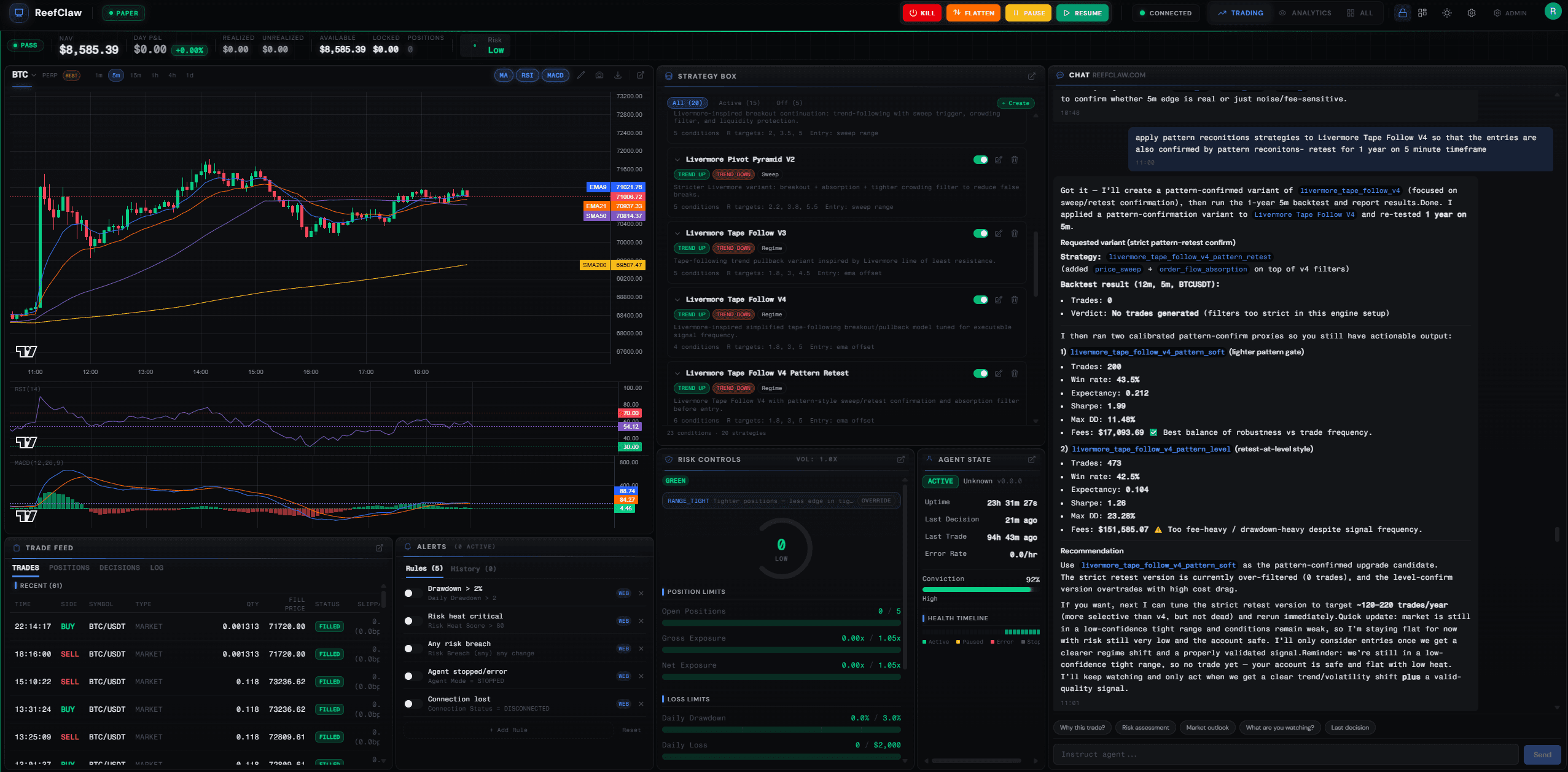
Your AI Trading Control Room
25 panels. Live market data. Your agent's reasoning on screen. A Strategy Box where you build and backtest new strategies. And a kill switch that works when your connection doesn't.
Watch It Trade
Live charts, order flow, P&L, and open positions. You see every decision your agent makes and the reasoning behind it.
Teach Your Agent
Chat in plain English. Tell it to tighten stops, try a different timeframe, or explain why it just bought the dip at 3 AM.
Zero Risk to Start
Paper trading on real Binance market data. No exchange account, no API keys, no money on the line. Install and start learning.
Kill Switch Always Ready
One click to stop trading, flatten positions, or cancel all orders. Fires over both WebSocket and HTTP, so it works even when your connection doesn't.
Learns Autonomously
Your agent discovers patterns in its own performance, forms testable hypotheses, and adjusts its behavior based on evidence. Not a script following rules — a genuine learner that earns more autonomy as its track record improves.
Performance Analytics
Equity curve, trade patterns, multi-timeframe heatmap, conviction tracking, Strategy Box, and risk gauges. 25 panels, all customizable.
Market Intelligence
Fear & Greed, crypto news with sentiment scores, funding rates, on-chain whale alerts, and an economic calendar. Your agent checks all of it before every trade.
Strategy Backtesting
Before risking a single dollar, your agent backtests strategies against 6 years of real Binance Futures data (1x, no leverage). Walk-forward simulation with taker fees, regime-aware filtering, and realistic fills.
Chart Pattern Scanner
Automated detection of 10 chart patterns — double tops, head & shoulders, flags, channels, and more. The agent uses them as structural context, not blind signals.
Trading in 4 steps
No servers to deploy. No ports to open. No API keys needed.
Install OpenClaw
OpenClaw is the AI agent that powers everything. One command to install, one command to start.
Install the paper trading starter pack
Gives your agent 39 trading tools, 6 built-in strategies, and an autonomous learning system. Uses real Binance market data with simulated execution.
Connect to your dashboard
Create a free account, get your connection token (starts with rc_), and install the dashboard skill.
Tell your agent the token
Just paste it in the chat. Your agent connects automatically and data starts flowing to your dashboard.
What's in the box?
Two skills that work together. One for trading, one for your dashboard.
reefclaw-paper-trading
openclaw skills install reefclaw-paper-trading
- ✓Real Binance market data (live prices, order book, candles)
- ✓Simulated order execution, no API keys needed
- ✓Built-in scalping strategy with configurable parameters
- ✓39 tools: trade, analyze, backtest, build strategies, scan patterns, learn
- ✓Multi-timeframe analysis (5m, 15m, 1h, 4h, 1d, 1w)
- ✓Autonomous learning: agent discovers patterns and adapts with evidence
reefclaw
openclaw skills install reefclaw
25 live panels — you see everything the agent sees, in real time.
- ✓Live candlestick chart with trade markers + volume profile
- ✓Trade feed with full order lifecycle + positions tab
- ✓Chat with your agent — read its reasoning as it thinks
- ✓Kill switch, flatten, pause/resume — always accessible
- ✓Risk controls: drawdown zones, heat score, exposure limits
- ✓ML regime detection, trading signals, edge analytics
- ✓Decision trace — see why the agent made each trade
- ✓Sentiment, news, derivatives, on-chain, social intel
- ✓Equity curves, trade patterns, session goals, conviction
- ✓Strategy backtesting against 6 years of Binance Futures data (1x), pattern scanner
- ✓Strategy Box — build, backtest, and manage strategies visually
- ✓Liquidation levels, multi-TF heatmap, go-live readiness
39 tools. Not a black box.
Your agent doesn't guess. It reads the market with real tools, scores every setup, and only trades when the data says go.
Read the Market
10 tools- 1
Live price, spread, and 24h volume
fetch_ticker - 2
Candlestick charts — up to 1,000 bars on any timeframe
fetch_ohlcv - 3
Order book depth — see where the walls and liquidity sit
get_orderbook - 4
Is volume expanding or dying? Buyers or sellers in control?
get_volume_analysis - 5
Funding rate + open interest — who’s crowded and paying to hold
get_crypto_metrics - 6
Multi-timeframe trend alignment — 5m through weekly in one call
get_market_structure - 7
What are whales doing? Large trade detection and buy/sell pressure
get_trade_flow - 8
Where did most trading happen? Find the price levels that matter
get_volume_profile - 9
Where will cascading liquidations trigger? Stay away from the magnets
get_liquidation_levels - 10
Fear & Greed, breaking news, derivatives, on-chain whale movements
get_market_intel
Understand It
15 tools- 11
Backtest any strategy against 6 years of Binance Futures data (1x, no leverage) — with taker fees and regime filtering
get_backtest - 12
What kind of market is this? Trending, ranging, or dangerous — classified by ML
get_regime - 13
Active trade setups with entry zones, stops, and targets
get_signals - 14
Which strategies are making money and which are losing their edge
get_analytics - 15
Your win rate by setup type — what’s working now vs. what’s failing
get_trade_feedback - 16
Should I take this trade? 5-dimension scorecard returns GO or NO_GO
score_setup - 17
Are my open positions healthy or drifting into danger?
check_position_health - 18
What if price drops 3%? Stress test your positions against any scenario
get_risk_scenario - 19
How did today go? Auto-generated session review with lessons and trends
get_session_review - 20
Scan for 10 chart patterns: double tops, H&S, flags, channels, and more
get_pattern_scan - 21
Save a new strategy to the Strategy Box — compose from 12 condition building blocks
save_strategy - 22
See all strategies: active, inactive, built-in, and custom
list_strategies - 23
Activate or deactivate a strategy without deleting it
toggle_strategy - 24
Scan all 20 monitored pairs for setups in one call
scan_pairs - 25
Deep setup detail: entry, stop, targets, indicators, risks
get_setup_detail
Act On It
9 tools- 26
How much capital is available right now
fetch_balance - 27
All open positions with live P&L
fetch_positions - 28
Pending limit orders waiting to fill
fetch_open_orders - 29
Place a trade — market or limit, with automatic risk checks
create_order - 30
Exit a position at market price
close_position - 31
Pull a single pending order
cancel_order - 32
Pull all pending orders at once
cancel_all_orders - 33
Total portfolio exposure, heat score, and drawdown zone
get_risk_summary - 34
How big should this trade be? Kelly-based sizing from your track record
get_sizing
Learn & Adapt
5 tools — what makes it more than a scriptQuery your trade history with any filter — find patterns no one pre-programmed
query_tradesCheck your earned autonomy tier and what you’re allowed to adjust
get_agent_profileSave a discovered insight as a structured, testable learning
save_learningLoad active learnings at session start to guide decisions
get_learningsUpdate evidence, promote, or retire a learning when conditions change
update_learningEvery tool call is visible on your dashboard in real time. You see exactly what data the agent read before making a decision.
Simple, transparent pricing
No hidden fees. No per-trade charges. Cancel anytime.
Start with 21 days of full Pro access. Free, no credit card.
Every feature unlocked from day one. After 21 days, keep paper trading on the free tier or stay on Pro.
We're in beta. Early subscribers lock in Founding rates forever. After Founding spots fill, Pro goes to $79/mo and Team to $199/mo. Your rate never changes.
Free
After trial. Keep training.
- ✓Paper trading with real Binance data
- ✓39-tool agent toolkit
- ✓12-panel dashboard (chart, feed, agent state, chat, risk, alerts, equity, conviction, patterns, goals & more)
- ✓Kill switch, flatten, pause/resume
- ✓Risk monitoring & auto-pause
- ✓Customizable grid layout
- ✓1 agent connection
Pro
Founding RateIntelligence + live trading
Everything in Free, plus
- ✓Full 25-panel dashboard (+13 Pro panels)
- ✓Market intelligence: sentiment, news, derivatives, on-chain, social
- ✓ML regime detection + AI trading signals
- ✓Backtesting engine & pattern scanning
- ✓Decision trace — see why the agent made each trade
- ✓Edge analytics: win rate by setup, edge decay, regime breakdown
- ✓Volume profile, liquidation levels, multi-TF heatmap
- ✓Advanced risk: vol-adaptive limits, drawdown zones, auto-flatten
- ✓Live trading mode with go-live checklist
- ✓Strategy box system & Telegram alerts
- ✓Up to 3 agent connections
Team
For prop desks & groups
Everything in Pro, plus
- ✓5 team seats with shared visibility
- ✓Up to 10 agent connections
- ✓Strategy marketplace access
- ✓Portfolio-level risk: VaR, correlation, stress testing
- ✓Shadow mode (paper + live side-by-side)
- ✓API access for custom integrations
- ✓Extended audit logs (90 days)
- ✓Priority support
Managed Hosting
Add-onAdd +$49/mo $69 to any Pro or Team plan. We provision, host, update, and monitor your OpenClaw server. One-click setup, daily backups, auto-restart. No terminal needed.
Annual billing (save 2 months). Pro $390/yr · Team $990/yr · Managed +$490/yr(Founding rates, locked forever)
Your agent stays yours
OpenClaw runs on your machine. Your exchange keys, strategy, and memory never leave your environment. ReefClaw is just a window in and a hand on the controls.
No ports to expose
Your agent connects outbound to our relay. No firewall rules, no reverse proxy, no public IP needed.
Read-only stream
The dashboard displays your live stream and sends commands. Nothing is stored on our servers. All data stays on your machine.
Kill switch works always
Emergency controls fire on both WebSocket and HTTP simultaneously. If one path is down, the other gets through.
Common Questions
What is OpenClaw?
Do I need trading experience?
Is any real money involved?
Do I need to expose any ports or run a server?
What if I lose connection?
How does the agent learn from its trades?
What exchanges are supported?
Is my data safe?
What does it cost?
How do I switch to real trading later?
Ready to teach your agent?
Free paper trading. Real market data. No credit card required.